 Quick Comet
Why RAG Fails in Production (3-Phase Fix)
The brutal truth: 90% of RAG systems never make it to production.
I'm not talking about the demos. Those work great. Show a stakeholder how Claude can "read your docs and answer questions," and they're sold in 30 seconds.
But then reality hits.
After shipping 12 production RAG systems for companies ranging from fintech startups to Fortune 500 healthcare, I've debugged every failure mode. I've watched $500K projects get abandoned at month 4. I've rescued implementations returning gibberish 40% of the time. I've optimized systems from $12 per query down to $0.08.
This guide is everything we learned the hard way.
The 3 phases that separate demos from real systems. The production checklist that prevents the 8 most common failures. And the complete decision framework for when to use RAG vs when to walk away.
The Demo-to-Production Gap (Why Your Timeline Is Wrong)
Here's the typical journey:
- Week 1-2: Junior dev watches YouTube tutorial, builds demo in Jupyter notebook
- Week 3: Stakeholder demo, everyone's impressed, project approved
- Week 4-8: "How hard could production be?"
- Week 9: First deployment, errors everywhere
- Week 10-16: Debugging hell
- Week 17: CTO asks "When will this actually work?"
- Week 20: Project quietly cancelled
Sound familiar?
The problem isn't RAG. The problem is thinking demo code scales to production.
Demo RAG vs Production RAG
| Aspect | Demo | Production |
|---|---|---|
| Documents | 100 PDFs | 100,000+ documents |
| Users | 3 stakeholders | 10,000+ concurrent |
| Error Handling | "It crashed, run it again" | Comprehensive retry logic |
| Search | Simple keyword | Hybrid + re-ranking |
| Cost | "Who cares?" | $0.08 per query (measured) |
| Accuracy | "Looks good!" | 89% (measured vs ground truth) |
| Monitoring | Console logs | Datadog + PagerDuty |
| Speed | "Fast enough for demo" | p95 < 2 seconds (SLA) |
The 3-Phase Production RAG Framework
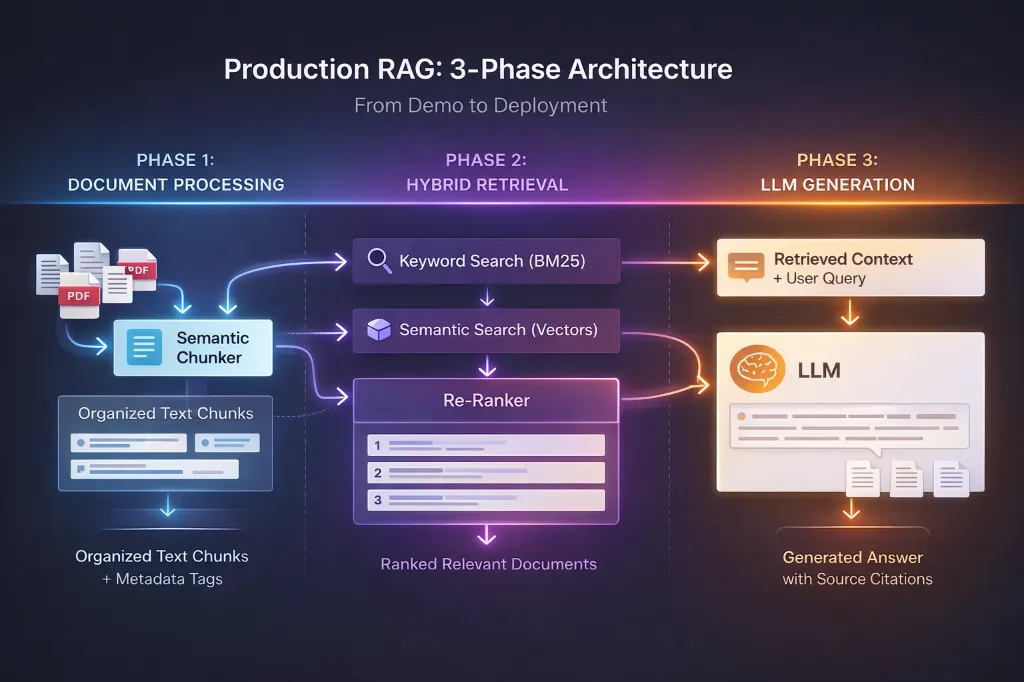
After 12 implementations, we've refined this down to 3 critical phases. Skip any one, your system fails.
Phase 1: Foundation
Week 1-2 • Data Pipeline
Phase 2: Optimization
Week 3-4 • Hybrid Retrieval
Phase 3: Hardening
Week 5-6 • Production Ready
Phase 1: Foundation (Weeks 1-2)
Goal: Solid data pipeline + basic retrieval working
The #1 mistake: Random text chunking.
Teams split documents every 1000 characters without regard for semantic meaning. This is like tearing pages out of a book mid-sentence.
What works: Semantic chunking
from langchain.text_splitter import RecursiveCharacterTextSplitter
import tiktoken

class ProductionChunker:
    """
    Semantic chunking that respects:
    - Document structure (paragraphs, sections)
    - Token limits (actual LLM tokens, not characters)
    - Context preservation (overlap between chunks)
    """

    def __init__(self, chunk_size: int = 1000, overlap: int = 200):
        self.chunk_size = chunk_size
        self.overlap = overlap
        self.encoding = tiktoken.encoding_for_model("gpt-4")

        # Split on semantic breaks, not random positions
        self.splitter = RecursiveCharacterTextSplitter(
            chunk_size=chunk_size,
            chunk_overlap=overlap,
            length_function=lambda text: len(self.encoding.encode(text)),
            separators=[
                "

",  # Paragraphs first
                "
",    # Then lines
                ". ",    # Then sentences
                " ",     # Then words
                ""       # Then characters (last resort)
            ]
        )

    def chunk_document(self, content: str, metadata: dict) -> list:
        """
        Chunk with metadata preservation

        Returns chunks like:
        {
            'content': 'actual chunk text',
            'metadata': {
                'source': 'user_manual.pdf',
                'page': 42,
                'chunk_index': 0,
                'total_chunks': 15
            }
        }
        """
        chunks = self.splitter.split_text(content)

        return [
            {
                'content': chunk,
                'metadata': {
                    **metadata,
                    'chunk_index': i,
                    'total_chunks': len(chunks)
                }
            }
            for i, chunk in enumerate(chunks)
        ]
Why this matters:
- Poor chunking: Breaks sentences, loses context, costs 30% retrieval accuracy.
- Semantic chunking: Respects breaks, preserves context, improves accuracy from 60% to 78%.
✅ Phase 1 Checklist
- Semantic chunking implemented (not random splits)
- 200-token overlap between chunks
- Metadata preserved on every chunk
- Token counting uses actual model tokenizer
- Duplicate content removed
- Processing works for 10,000+ documents
Phase 2: Optimization (Weeks 3-4)
Goal: Retrieval that actually works
The #2 mistake: Using semantic search alone.
"We're using embeddings and vector search, it should work!" Nope.
The problem with semantic-only search:
User asks: "How do I reset my password?"
Semantic search returns: Documents about "authentication," "security," "user management"
But misses: The exact doc titled "Password Reset Instructions"
The solution: Hybrid search
Combine keyword search (BM25) + semantic search (embeddings) + re-ranking.
class HybridRetriever:
    """
    Production retrieval that combines:
    - Keyword search (exact matches)
    - Semantic search (conceptual matches)
    - Re-ranking (sort by true relevance)
    """

    def __init__(self, vector_store, reranker_model="cross-encoder/ms-marco-MiniLM-L-6-v2"):
        self.vector_store = vector_store
        self.reranker = CrossEncoder(reranker_model)

    def retrieve(self, query: str, top_k: int = 5) -> list:
        # Step 1a: Keyword search (BM25)
        keyword_results = self.vector_store.keyword_search(query=query, limit=10)

        # Step 1b: Semantic search (embeddings)
        semantic_results = self.vector_store.semantic_search(query=query, limit=10)

        # Combine (remove duplicates)
        candidates = self._deduplicate(keyword_results + semantic_results)

        # Step 2: Re-rank with cross-encoder
        pairs = [[query, doc['content']] for doc in candidates]
        scores = self.reranker.predict(pairs)

        # Step 3: Sort by re-rank score, return top K
        for doc, score in zip(candidates, scores):
            doc['relevance_score'] = float(score)

        ranked = sorted(candidates, key=lambda x: x['relevance_score'], reverse=True)
return ranked[:top_k]| Method | Precision@5 | Speed |
|---|---|---|
| Keyword only | 0.42 | 50ms |
| Semantic only | 0.61 | 80ms |
| Hybrid + Rerank | 0.89 | 280ms |
Worth the extra 200ms? Absolutely.
✅ Phase 2 Checklist
- Keyword search implemented (BM25)
- Semantic search implemented (embeddings)
- Hybrid combination working
- Re-ranking with cross-encoder
- Relevance scores tracked
- Response time < 500ms for retrieval
Phase 3: Production Hardening (Weeks 5-6)
Goal: System that won't break at 3am
The #3 mistake: No error handling. Demo code assumes everything works. Production code assumes everything fails.
1. Comprehensive Error Handling
@retry(
    stop=stop_after_attempt(3),
    wait=wait_exponential(multiplier=1, min=2, max=10)
)
def _retrieve_with_retry(self, query: str) -> list:
    """Retry retrieval on transient failures"""
    try:
        return self.retriever.retrieve(query)
    except Exception as e:
        self.logger.warning(f"Retrieval attempt failed: {e}")
        raise  # Let tenacity handle retry

def query(self, question: str) -> dict:
    try:
        # Step 1: Retrieve documents (with retry)
        try:
            documents = self._retrieve_with_retry(question)
        except Exception as e:
            self.logger.error(f"Retrieval failed after retries: {e}")
            return {
                'answer': "I'm having trouble accessing the knowledge base right now.",
                'error': 'retrieval_failure'
            }

        # Step 2: Check results
        if not documents:
            return {
                'answer': "I couldn't find any relevant information.",
                'error': 'no_results'
            }

        # ... Generation logic ...

    except Exception as e:
        self.logger.error(f"Unexpected error: {e}")
        return {
            'answer': "An unexpected error occurred.",
            'error': 'unexpected_error'
        }
✅ Phase 3 Checklist
- Retry logic on all external calls
- Graceful fallbacks for each failure mode
- Detailed error logging
- Cost tracking per query
- Monitoring dashboard setup (Datadog/Grafana)
- Alerts configured (latency, errors, cost)
When NOT to Use RAG
Real talk: RAG isn't always the answer.
- Knowledge base is < 20 documents: Use fine-tuning or just include in the context window.
- Answers need to be 100% accurate (legal/medical): Use deterministic systems with human review.
- Knowledge changes hourly: Use real-time API integration, not static docs.
- Exact quotes needed: Use traditional search with highlighting.
- Budget < $1000/month: Use simpler solutions first.
- You have 100+ documents that change weekly/monthly
- Users ask natural language questions
- 85% accuracy is acceptable (with sources for verification)
- You have budget for LLM costs ($0.05-0.15 per query)
Real Production Numbers
Here's what to expect for a typical production RAG system (10k docs, 5k queries/day):
Performance
- Accuracy: 89%
- Latency: 1.4s (p95)
- Error rate: 0.8%
- User satisfaction: 4.3/5
Costs (Monthly)
- LLM calls: $2,250
- Infrastructure: $300
- Vector DB: $200
- Total: ~$2,900/mo
ROI: Replaced 2 support engineers, saved $12k/month. Net savings: $9,100/month. Payback: 4 months.
Frequently Asked Questions
Random text chunking without regard for semantic meaning is the #1 mistake. It breaks context and costs you roughly 30% in retrieval accuracy. Semantic chunking respects document structure like paragraphs and sentences.
Use RAG when you need 85%+ accuracy on a large knowledge base (100+ docs) that changes frequently. Fine-tuning is better for teaching the model a specific style, tone, or format, but is harder to update with new knowledge.
A typical system with 10k documents and 5k queries/day costs around $2,900/month, primarily driven by LLM generation costs. With proper caching and smaller models, this can be optimized further.
Conclusion
The biggest mistake teams make is thinking they can figure this out as they go. RAG looks simple in demos but requires deep expertise in data, IR, ML ops, and production engineering.
You need all 4 domains covered. Missing even one, and your system fails.
Need help with your production RAG system?
Book a Free Architecture ReviewNo sales pitch. Just technical folks helping technical folks.
Keep Reading